
Click on the Manage Content for adding and managing content.
Click on the Rotator Settings and choose what and how it will be displayed.

From idea to invoice: What to set up before you launch a business

Kraig Pakulski 0 24 Article rating: No rating

A female entrepreneur holding a pen while working with a laptop.

Sutthicha Weerawong // Shutterstock


You’ve got a great idea and maybe even landed your first customer. But turning that idea into a real business and sending your first invoice can feel daunting. There’s paperwork, decisions, and a hundred “where do I even start?” moments. The truth is, every founder faces this, and you’re far from alone. Rest assured: You have access to more tools and support than ever to help you get it right.

This guide is your business launch checklist, with tips and tricks for how to get your own business going, without getting stuck in admin quicksand. Whether you’re starting an ecommerce shop, a consultancy, or a creative side hustle, you’ll find the essential steps to add to your small business launch checklist. Here, Mercury, a fintech for entrepreneurs, breaks down what to set up before your first invoice goes out, so your business launch runs smoothly and you’ll be ready to collect that first payment.

1. Register your business

Registering your business gives you a legal identity, so you can open a business bank account, sign contracts, and start getting paid. These are four key steps in every new business launch checklist:

  1. Choose a business name. Pick a business name that fits your brand. Then, check if it’s available in your state registry, and search domain names for relevant website options.
  2. Decide on a business structure. Since it’s fast and simple, many founders start with a sole proprietorship or an LLC for added liability protection and credibility. If you plan to raise funds later, you might consider a C Corp from the start. Other options include forming an S-Corp, general partnership, and more. To determine the best business structure options for you, consider consulting with a professional tax or financial advisor*.
  3. Register with your state. Each state has its own process, but generally, you’ll file formation documents and pay a fee.
  4. Get your Employer Identification Number (EIN). Your EIN is like your business’s Social Security number. It’s free to get from the IRS and is required for most financial and tax forms.

Once these steps are completed, you’ll have a legal foundation and a real business you can build on.

2. Set up your business finances

Once your business is official, it’s time to get your finances in order. This step is about keeping your business money separate from your personal finances, so you can track growth, manage taxes, and look professional to clients and investors.

Start with these three basics:

  1. Open a business bank account. A dedicated account helps you manage and organize your finances, which also helps keep your taxes more straightforward. It’s also required if you ever apply for funding. Here’

How business insurance can help protect you from snow, hail and winter storm damage

Kraig Pakulski 0 23 Article rating: No rating

A person shovels snow in a neighborhood.

John Hanson Pye // Shutterstock


Winter storms can reduce foot traffic to a brick and mortar retail business. There’s also supply chain disruptions, power outages, property damage, spoiled inventory and more to consider during the winter months. And yet, according to an ERGO NEXT survey, more than half of small business owner respondents admitted that they don’t feel adequately insured. 48% of restaurant owners alone reported winter weather-related damage to their business.

With unpredictable storms becoming more frequent and severe across the U.S., small businesses need to be better prepared for wintry conditions.

How can snow, hail, ice and winter storms damage your business?

Severe winter weather can cause extensive damage to your business, both in physical impact and operational disruptions.

Here are some of the most common risks:

  • Roof damage. Heavy snow and ice accumulation can lead to roof collapses, leaks or structural strain.
  • Frozen pipes and water damage. Extreme cold can cause pipes to freeze and burst, leading to flooding, water damage and mold growth.
  • Hail damage. Hail can crack windows, dent exteriors and damage vehicles parked outside.
  • Slip-and-fall hazards. Icy sidewalks and parking lots increase liability risks if a customer or employee is injured.
  • Business interruptions. Power outages, impassable roads or facility damage can force businesses to temporarily close. These kinds of business interruptions can lead to lost revenue.

8 tips to help protect your business from winter storms

Winter storms can’t be prevented, but businesses can take proactive steps to reduce their vulnerabilities.

Here are some protection tips to help safeguard your business:

1. Inspect and maintain your roof

  • Remove excess snow to prevent roof collapse.
  • Inspect for loose shingles, cracks or leaks before winter begins.
  • Reinforce older roofs to withstand heavy snow and ice accumulation.

2. Prevent frozen and burst pipes

  • Insulate exposed pipes, especially in unheated areas like basements or storage rooms.
  • Keep indoor temperatures above freezing, even when your business is closed.
  • Let faucets drip slightly to relieve pressure in the pipes during extreme cold.

3. Clear snow and ice around your property

  • Shovel and salt sidewalks, entryways and parking lots to help reduce slip-and-fall accidents.
  • Install non-slip mats at entrances to prevent wet floors indoors.
  • Hire a professional snow removal service if needed.

4. Review and update your business insurance coverage

  • Check that your policies include winter storm protecti

How to implement AI training for employees

Kraig Pakulski 0 26 Article rating: No rating

A row of employees working in an office.

SFIO CRACHO // Shutterstock


Most teams don’t struggle to implement AI in their daily workflows because they’re resistant to change. They struggle because they haven’t been given the structure to learn how to use it effectively.

Employees who receive formal AI training are far more likely to see it as a boost to their productivity and efficiency. Yet only about 50% of workers using AI today say their organization has offered any training at all.

That’s the gap. Teams are eager to embrace AI, but without shared guidance or standards, progress stalls and valuable opportunities slip by.

Zapier shares a step-by-step approach to building an AI training program that empowers employees to experiment safely, work more efficiently, and scale their impact across the organization.

Why AI training for employees matters

AI training isn’t about turning every employee into a prompt engineer. It’s about giving people the context, confidence, and guardrails to use AI responsibly and effectively. Here are more key reasons why providing structured AI training for employees matters.

  • It accelerates AI adoption. When employees see practical, role-specific examples of how AI can help them, they’re far more likely to embrace it. Training turns abstract concepts into actionable habits—so AI becomes part of daily workflows, not an occasional experiment.
  • It improves productivity. When employees understand how to effectively use AI to automate routine work—like drafting content, analyzing feedback, or summarizing meeting notes—they can free up time to focus on higher-impact tasks. Training helps them recognize where AI adds the most value instead of using it for novelty’s sake.
  • It unlocks new opportunities. Anyone can use ChatGPT to write a haiku about the office dog. But structured training helps employees go deeper—spotting ways to integrate AI into complex workflows, connect tools across systems, and rethink how their roles can evolve with AI.
  • It drives measurable ROI. AI investments only pay off when people know how to apply them effectively. Well-trained teams can identify high-impact use cases, automate processes at scale, and measure performance gains—transforming AI from a cost center into a competitive advantage.
  • It builds confidence. Untrained teams often hesitate to use AI because they’re unsure what’s allowed or worry about doing it “wrong.” Formal training removes that uncertainty. It empowers employees to experiment, make informed decisions, and use AI to solve real problems.
  • It reduces risk. Without clear guidelines, people tend to use AI in the shadows—copying data into unsecured

How gas prices have changed in the U.S. in the last week Jan. 20, 2026

Kraig Pakulski 0 26 Article rating: No rating

Istvan Csak // Shutterstock


CheapInsurance.com compiled statistics on gas prices in the U.S. using data from AAA. Gas prices are current as of January 20.

U.S. by the numbers
– Gas current price: $2.82
– Week change: +$0.00 (+0.1%)
– Year change: -$0.30 (-9.7%)
– Historical expensive gas price: $5.02 (6/14/22)

– Diesel current price: $3.51
– Week change: +$0.01 (+0.2%)
– Year change: -$0.12 (-3.3%)
– Historical expensive diesel price: $5.82 (6/19/22)

Metros with the least expensive gas
#1. Lawton, OK: $2.21
#2. Casper, WY: $2.22
#3. Lubbock, TX: $2.23

Read on to see which metros have the most expensive gas prices.

Christian Mueller // Shutterstock

#5. San Luis Obispo-Atascadero-Paso Robles, CA

– Regular gas price: $4.43

jittawit21 // Shutterstock

#4. Kahului, HI

– Regular gas price: $4.43

Daniel Avram // Shutterstock

#3. Wailuku, HI

– Regular gas price: $4.43

Elen Nika // Shutterstock

#2. Hilo, HI

– Regular gas price: $4.62

Rangsarit Chaiyakun // Shutterstock

#1. Lihue (Kauai), HI

– Regular gas price: $4.92

This story was produced by CheapInsurance.com and reviewed and distributed by Stacker.

The post How gas prices have changed in the U.S. in the last week Jan. 20, 2026 appeared first on News Channel 3-12.

Finding your healthiest sleep position: Comparing side, back, and stomach sleeping

Kraig Pakulski 0 27 Article rating: No rating

A young woman sleeping on her back.

Grustock // Shutterstock


You spend about a third of your life asleep — but is your sleep position working for you or against you?

The reality is that not all sleep positions are created equal. The way you sleep can impact spinal alignment, breathing, digestion and even how refreshed you feel in the morning. Some sleeping positions offer better support, while others can lead to discomfort or restless nights.

If you’re regularly waking up stiff, sore or groggy, your sleeping position just may be the culprit. In this guide, Naturepedic breaks down the best sleeping positions — side, stomach and back — so you can determine the correct way to sleep for your body. You’ll also find answers to common questions, like what is the best sleeping position for digestion, back pain or pregnancy.

Even small adjustments to your sleep posture might help you wake up feeling better rested and pain-free. So take the first step toward healthier sleep and keep reading!

The Big 3 Sleep Positions: Side, Stomach and Back Sleeping

Each sleeping position comes with its own benefits and drawbacks. While some naturally support spinal alignment and deep sleep, others can lead to discomfort or even long-term strain — and because everyone sleeps differently, what works for one person might not work for you! Understanding the pros and cons of common sleep positions can help you decide whether small adjustments could improve the way you rest.
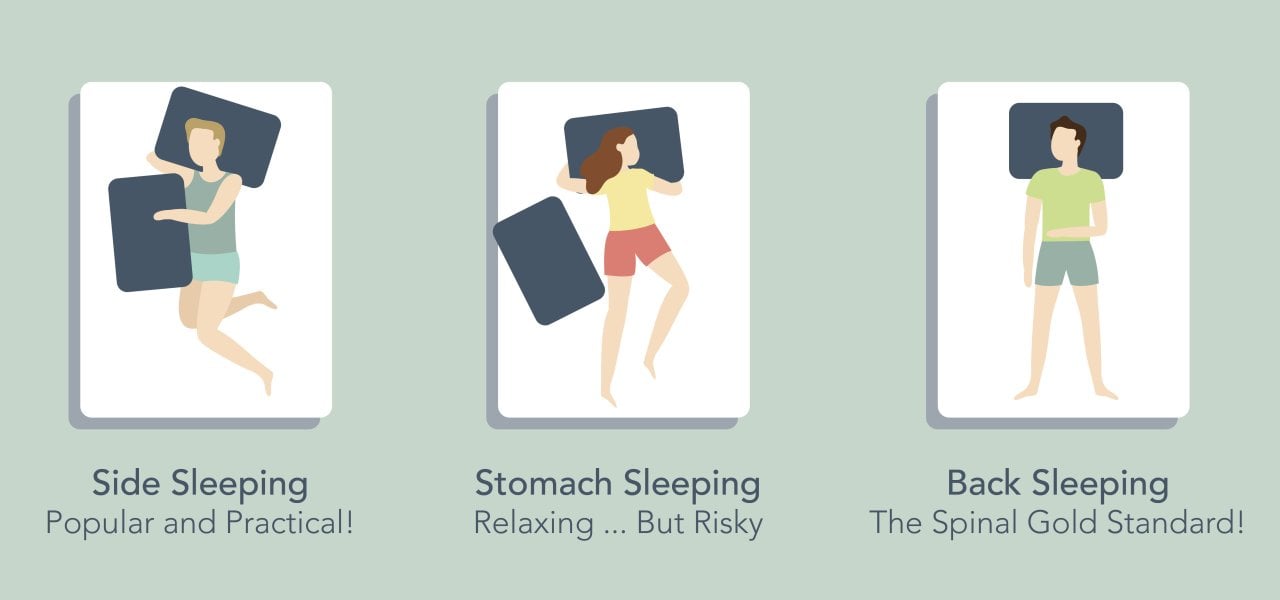
An infographic showing illustrations of the big 3 sleep positions: side, stomach, and back sleeping.

Naturepedic

Side Sleeping — Popular and Practical

Side sleeping is one of the most common sleeping positions, and for many, it’s the best position to sleep in for spinal health and digestion. This posture provides a balance of comfort and support — but without proper alignment, it can also lead to discomfort.

Pros

  • May reduce snoring and mild sleep apnea
  • Helps with acid reflux (left side)
  • Improves circulation
  • Reduces pressure on the lower back

Cons

  • Can cause shoulder and hip discomfort
  • May increase facial wrinkles
  • Causes occasional arm numbness
  • Can put pressure on internal organs (right side)

Stomach Sleeping — Relaxing But Risky

For some, sleeping on the stomach feels natural and cozy, but it’s not the best sleeping position for posture or spinal health. While it can help reduce snoring, it’s not as effective as side sleeping in this regard. Plus, the downsides often outweigh the benefits.

Pros

  • May reduc
RSS
First36573658365936603662366436653666Last